2.5 Create api key
Create an order using ApiKey
The Api Key is associated with the chain and merchant's address. If a merchant wishes to place an order through the backend SDK and receive hashnut callback notifications, they need to create an api key.
Enter the creation page
After entering the hashnut merchant system, click on the development button on the left navigation bar, and then select Create API Key.
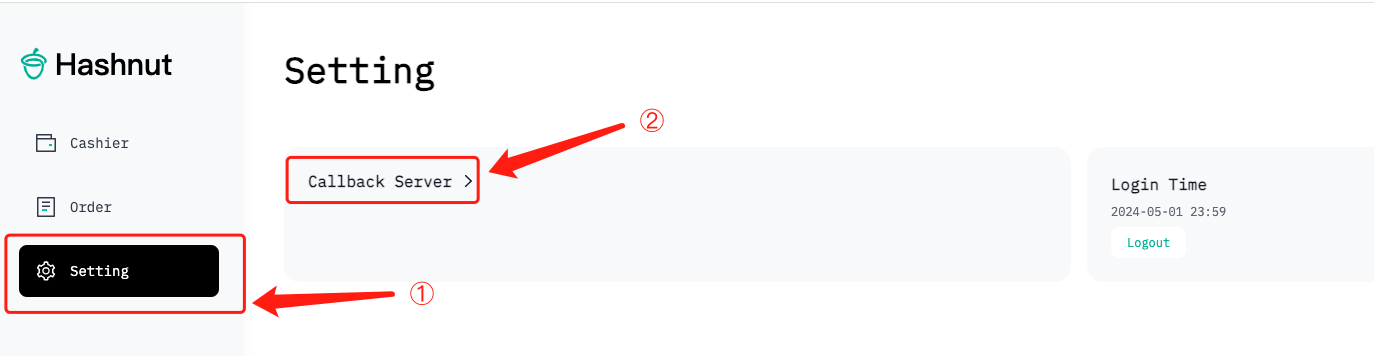
Enter relevant information
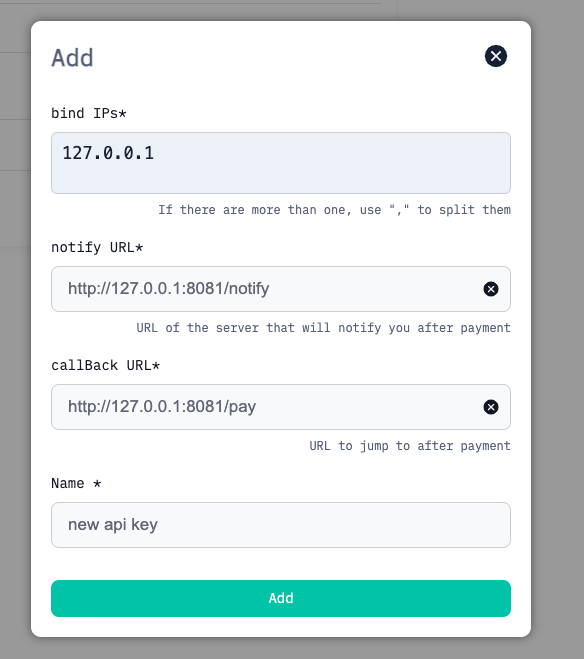
| Field | Description |
|---|---|
| Name | Description of the Api key for easy reference by the merchant |
| callback URL | The page address to redirect to after completing frontend H5 payment |
| bind IP | The public IP address of the server used to initiate requests such as creating orders with the Api Key |
| notify URL | URL for the merchant system backend to receive payment platform notifications |

The above demonstration is for using eth. If the merchant wants to use tron, log out, then log in again using tronlink, and repeat the above steps.